
Async Media Generation in Hermes Agent With OpenRouter Webhooks
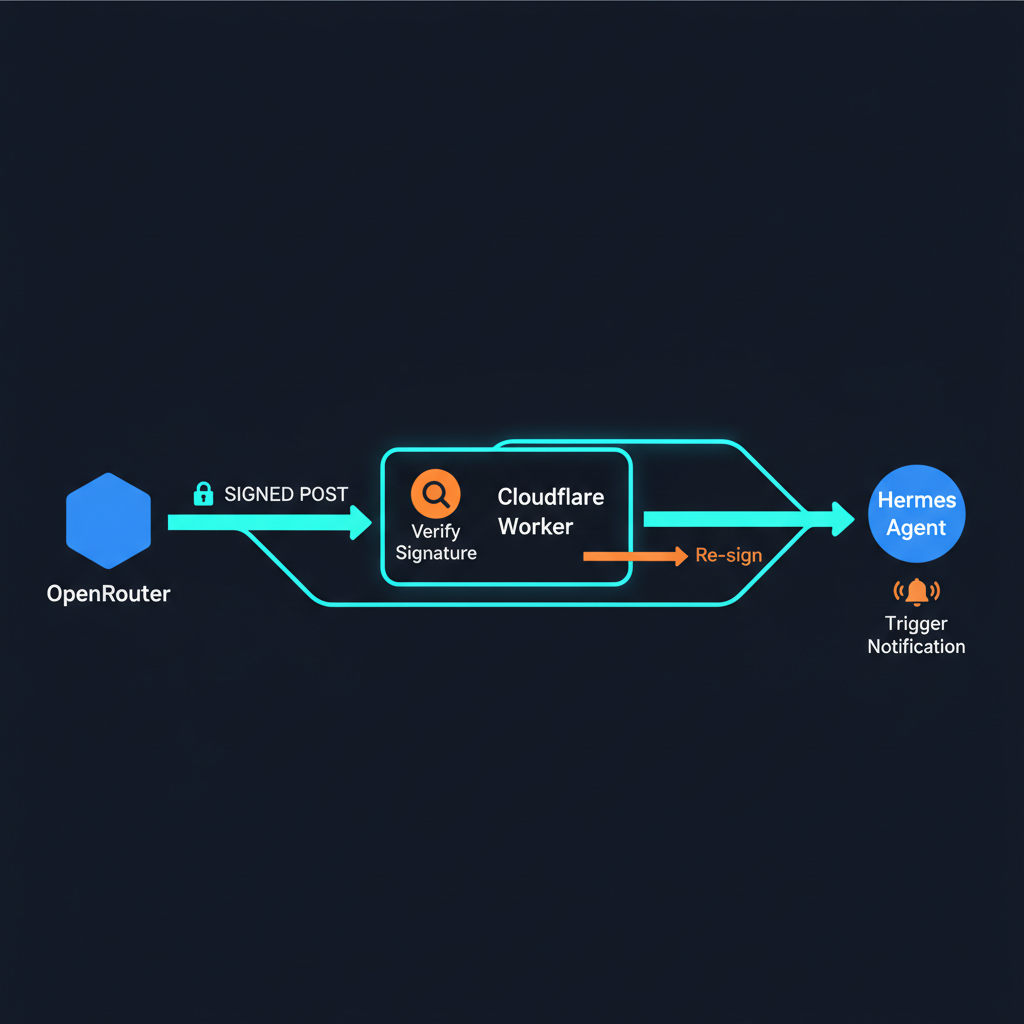
OpenRouter's video generation is asynchronous -- you submit a job, wait seconds to minutes, and OpenRouter POSTs a callback when it is done. Hermes Agent has a webhook platform that can receive those callbacks and trigger an agent run. The two speak different signature dialects.
OpenRouter signs with t=<epoch>,v1=<hex-hmac> over timestamp + "," + rawBody. Hermes expects X-Hub-Signature-256: sha256=<hex-hmac> over rawBody. Neither side needs to change -- you drop a Cloudflare Worker between them that validates the OpenRouter signature and re-signs for Hermes. A Cloudflare Tunnel exposes the local Hermes webhook gateway without opening a port.
| Component | What it does | Runs on |
|---|---|---|
| OpenRouter | Generates video, POSTs completion event to callback URL | Cloud |
| Cloudflare Worker | Validates OpenRouter HMAC, re-signs for Hermes, forwards | Cloudflare edge |
| Cloudflare Tunnel | Exposes localhost:8644 as a public HTTPS URL | Hermes machine |
| Hermes Webhook | Validates Hermes HMAC, runs agent with template-filled prompt | Hermes machine |
Architecture
OpenRouter (video complete)
  | POST {event} + X-OpenRouter-Signature: t=...,v1=...
  v
Cloudflare Worker (openrouter-hermes-bridge)
  | 1. Verify t= + v1= against OPENROUTER_SIGNING_SECRET
  | 2. Re-sign body with HERMES_WEBHOOK_SECRET
  | 3. Forward to HERMES_ENDPOINT
  v
Cloudflare Tunnel (hermes-webhook.underdown.app)
  | Encrypted QUIC tunnel
  v
Hermes Webhook Gateway (localhost:8644)
  | Validate X-Hub-Signature-256
  | Run agent: "Video ready: {data.unsigned_urls}"
  v
Discord/Telegram: "Download: https://..."
Two independent HMAC secrets protect the chain. The Worker's OPENROUTER_SIGNING_SECRET validates inbound requests. A separate HERMES_WEBHOOK_SECRET signs outbound requests. Compromising one does not give you the other.
The Worker also enforces a 5-minute timestamp window on OpenRouter signatures, preventing replay attacks even if the signing secret leaks.
The Worker (21 lines of logic)
The Worker validates, translates, and forwards. The full source is at github.com/underdown/openrouter-hermes-webhook -- here is the core:
export default {
  async fetch(request, env, ctx) {
    if (request.method !== "POST") {
      return new Response("Method not allowed", { status: 405 });
    }

    // 1. Verify OpenRouter signature (t= + v1= format)
    const rawBody = await request.arrayBuffer();
    const orSignature = request.headers.get("X-OpenRouter-Signature");

    if (!orSignature || !verifyOpenRouterSignature(rawBody, orSignature, env.OPENROUTER_SIGNING_SECRET)) {
      return new Response("Invalid signature", { status: 401 });
    }

    const bodyText = new TextDecoder().decode(rawBody);

    // 2. Re-sign with Hermes HMAC-SHA256
    const hermesSig = "sha256=" + await signHermes(bodyText, env.HERMES_WEBHOOK_SECRET);

    // 3. Forward
    const resp = await fetch(env.HERMES_ENDPOINT, {
      method: "POST",
      headers: {
        "Content-Type": "application/json",
        "X-Hub-Signature-256": hermesSig,
      },
      body: bodyText,
    });

    const responseText = await resp.text();
    return new Response(responseText, { status: 200 });
  },
};
The verifyOpenRouterSignature function reconstructs the signed payload as timestamp + "," + rawBody (concatenated as byte buffers, not a string) and verifies against v1=. A 5-minute tolerance window on the timestamp blocks replay.
Tunnel Setup
The Hermes webhook gateway listens on localhost:8644. You need a public URL that OpenRouter can reach. Cloudflared gives you two options:
Quick Tunnel (10 seconds, no account needed)
cloudflared tunnel --url http://localhost:8644 2>&1 | tee /tmp/tunnel.log &
# Extract the URL:
grep -o 'https://[^.]*\.trycloudflare\.com' /tmp/tunnel.log | head -1
# https://harold-julian-because-fleece.trycloudflare.com
Zero configuration, zero DNS, zero Cloudflare account. The URL changes on restart -- fine for dev, and the Worker sits between the tunnel and OpenRouter so you can restart the tunnel independently without touching your OpenRouter webhook settings.
Named Tunnel (persistent URL)
For a stable URL that survives restarts, use a named tunnel with a Cloudflare-managed domain:
# One-time setup
cloudflared tunnel create hermes-openrouter
cloudflared tunnel route dns hermes-openrouter hermes-webhook.underdown.app

# Config at ~/.cloudflared/config.yml:
# tunnel: <tunnel-id>
# credentials-file: ~/.cloudflared/<tunnel-id>.json
# ingress:
#   - hostname: hermes-webhook.underdown.app
#     service: http://localhost:8644
#   - service: http_status:404

# Run
cloudflared tunnel run hermes-openrouter
The CNAME record hermes-webhook → <tunnel-id>.cfargotunnel.com already exists. The public hostname entry in the Zero Trust dashboard maps the domain to localhost:8644.
Hermes Webhook Subscription
Create a subscription that parses the OpenRouter payload fields into an agent prompt:
hermes webhook subscribe openrouter-video \
  --prompt "Video generation completed.
Job ID: {data.id}
Model: {data.model}
Status: {data.status}
URLs: {data.unsigned_urls}
Cost: ${data.usage.cost}

Download the video and send it to Ryan with the file path." \
  --events "video.generation.completed,video.generation.failed" \
  --secret "<hmac-secret-matching-worker>" \
  --deliver origin \
  --description "OpenRouter async video callbacks"
Template fields available from OpenRouter's payload:
| Template | Example value |
|---|---|
| {data.id} | job_abc123 |
| {data.model} | kling/kling-v2.0 |
| {data.status} | completed / failed / cancelled / expired |
| {data.unsigned_urls} | Array of download URLs |
| {data.usage.cost} | 0.042 |
| {data.error} | Error message (only on failure) |
End-to-End Test
# Test the full chain with a simulated OpenRouter webhook
TIMESTAMP=$(date +%s)
BODY='{"type":"video.generation.completed","data":{"id":"test-1","model":"kling/kling-v2.0","status":"completed","unsigned_urls":["https://cdn.openrouter.ai/video/test.mp4"],"usage":{"cost":0.042}}}'

# OpenRouter signature: HMAC(timestamp + "," + rawBody)
OR_SIG=$(echo -n "${TIMESTAMP},${BODY}" | openssl dgst -sha256 -hmac "${OPENROUTER_SECRET}" | cut -d' ' -f2)

# Send through the Worker
curl -s -X POST https://openrouter-hermes-bridge.underdown.workers.dev \
  -H "Content-Type: application/json" \
  -H "X-OpenRouter-Signature: t=${TIMESTAMP},v1=${OR_SIG}" \
  -d "${BODY}"

# Expected: 200 OK, agent run triggered, video file delivered to Discord
What This Unlocks
Once the bridge is running, any OpenRouter async generation endpoint works with Hermes:
- Video generation: Kling v2.0, Runway Gen-4, Luma Ray 2. Submit from Hermes, get the file delivered to chat when done.
- Batch image pipelines: Submit 50 images, webhook fires when the batch completes. Agent picks up the URLs and processes them.
- High-resolution upscaling: Long-running upscale jobs that would time out a synchronous request.
- Large media renders: Anything where the generation takes longer than an HTTP timeout.
The Worker and tunnel together cost zero dollars -- the free tier on both Cloudflare Workers (100k requests/day) and Cloudflare Tunnel (unlimited) covers any realistic volume of webhook callbacks.
Deploy It Yourself
The Worker is open source at github.com/underdown/openrouter-hermes-webhook. Three secrets, one wrangler deploy, and a tunnel -- under 5 minutes from clone to working pipeline.
git clone https://github.com/underdown/openrouter-hermes-webhook.git
cd openrouter-hermes-webhook

# Set secrets
wrangler secret put OPENROUTER_SIGNING_SECRET   # from OpenRouter workspace settings
wrangler secret put HERMES_WEBHOOK_SECRET         # from Hermes config.yaml
wrangler secret put HERMES_ENDPOINT               # Cloudflare Tunnel URL

# Deploy
wrangler deploy

# Start tunnel on Hermes machine
cloudflared tunnel --url http://localhost:8644 &

# Create subscription
hermes webhook subscribe openrouter-video \
  --prompt "Video ready: {data.unsigned_urls}" \
  --events "video.generation.completed" \
  --secret "<same-as-HERMES_WEBHOOK_SECRET>" \
  --deliver origin
Set OpenRouter's webhook callback URL to your Worker URL and you are done.